Cortega Legal · Powered by Cortega AI Governance

Cortega Legal

Matter management, document review, research and drafting.

Book a demo
Document review at a desk
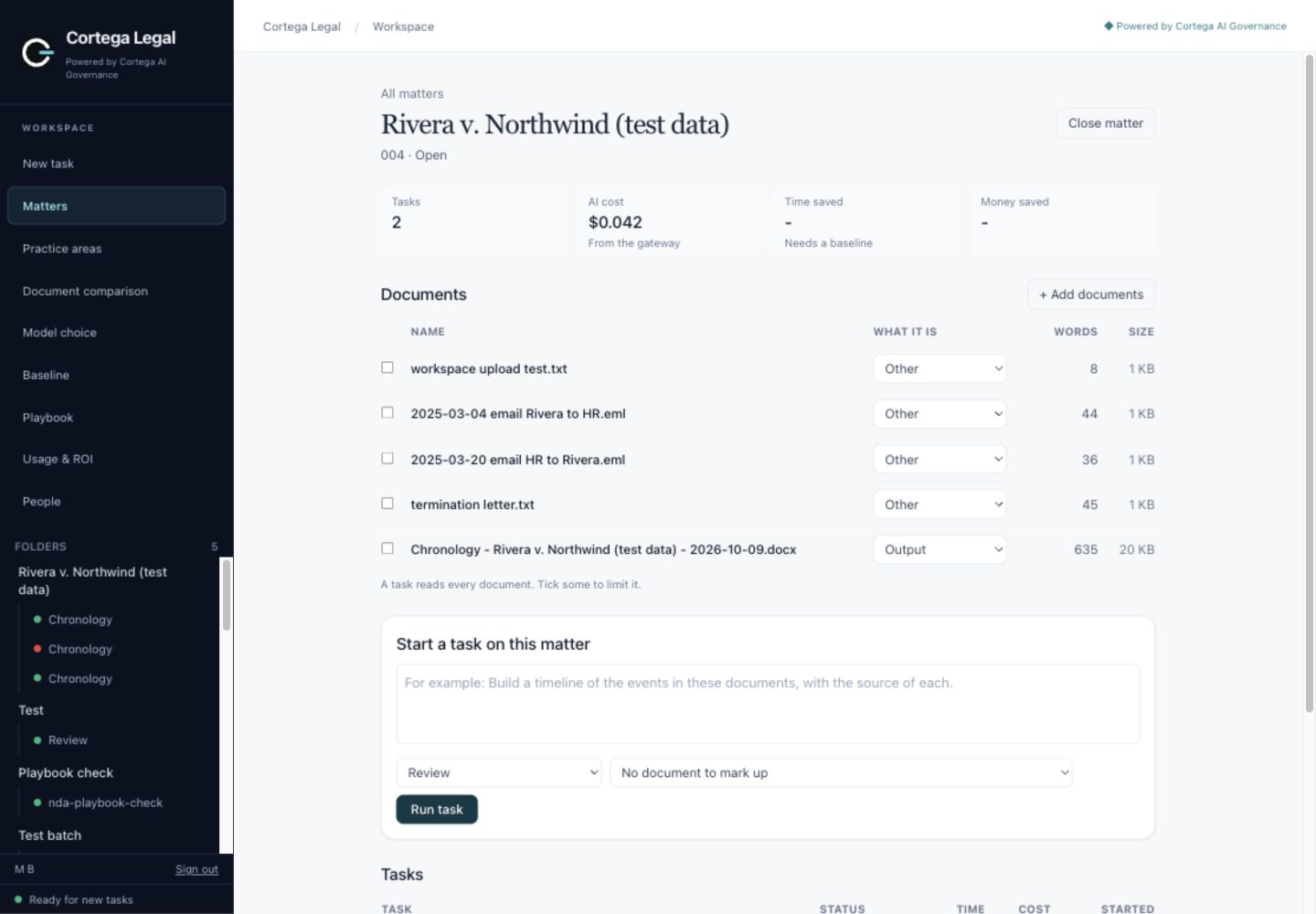
Cortega Legal sample matter, documents and task controls
Matter documents, tasks and cost in one place.Enlarge screenshot ↗
Word redlinesSource-backed comparisonsFirm playbooksTask cost & ROI
Why Cortega Legal

Governance and model controls

Govern every AI request

Access policies and spending limits apply to AI requests.

AI Governance · Solution →

Keep sensitive work private

Local models for privileged work. Approved remote models for research.

Private AI · Solution →

Choose your models

Open or hosted models. Bring compatible provider credentials.

Model choice · Solution →

Verify the answer

AI Verifier Guard checks citations and claims against sources.

AI Verifier · Solution →

Bring your legal skills

Reuse Claude-format skills and your firm’s playbooks.

Building agents · Resources →

Improve model performance

Model Performance Booster checks accuracy and relevance in the workflow.

Accuracy controls · Solution →
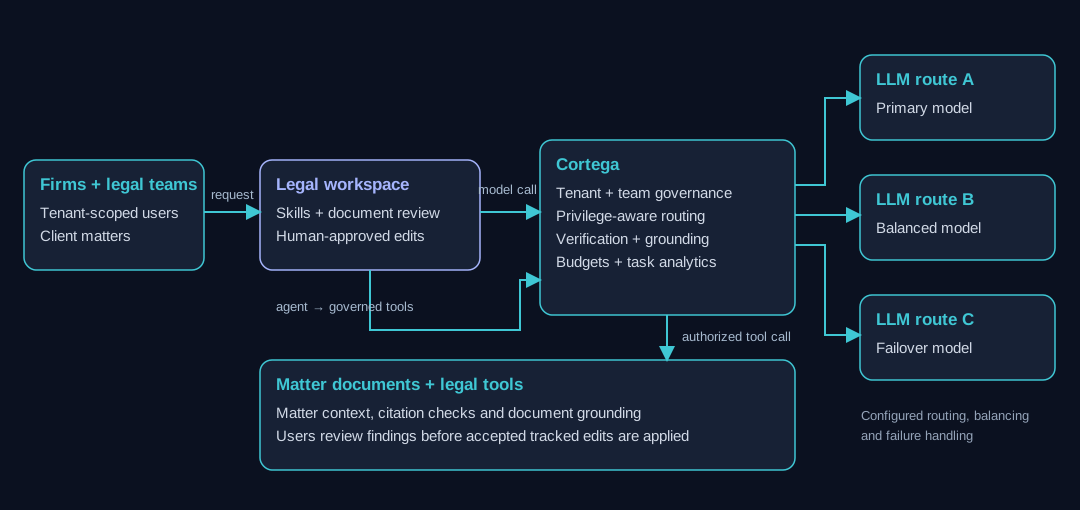
See how Cortega governs the workspace →Legal teams, workspace, Cortega governance, model routes and matter tools
How legal work moves through Cortega Legal

From matter intake to the filed memo.

1

Open the matter

Client, number and type. Documents, tasks and results stay together, and a closed matter stays as the record.

2

Add the documents

Word files, emails, spreadsheets, slide decks and PDFs.

3

Choose the work

Pick a skill for your practice area, or describe the task in words.

4

Review the result

A Word memo you can edit, or a tracked-changes redline you accept or reject.

5

Check the sources

Citations and quotes are checked against the documents and the sources.

6

Keep the record

The memo is filed with the matter. Each task shows its cost, its time and what it saved.

Colleagues working together at a meeting table
Corporate legal & law firms

The work, by practice area.

  • Contract reviewA redline in Word against your playbook, with the reason for each change.
  • NDA triageA fast check against your NDA rules.
  • SaaS and vendor agreementsIssues and a redline for the terms that matter.
  • Counterparty proposalsCompare a markup to your playbook and flag what needs escalation.
  • RenewalsTerms, notice dates and amendments in one history.
  • Stakeholder summaryA short summary the business can read.
  • Diligence issuesExtract issues across the data room, with the source for each.
  • Review tablesOne answer per document and question, each with its quote.
  • Material contract scheduleA schedule built from the contracts.
  • Board minutes and consentsDraft minutes and written consents from your notes.
  • Closing checklistTrack signature pages and deliverables.
  • Deal team summaryCurrent status for the whole team.
  • Termination reviewRisks and selection factors for a proposed termination.
  • Worker classificationEmployee or contractor, with the factors applied to the facts.
  • Handbooks and policiesGaps by state, and drafts of new policies.
  • Internal investigationsOpen the matter, log evidence and interviews, write the memo.
  • Wage and hourAnswers with the rule and its source.
  • Leave and accommodationTrack requests and the steps taken.
  • ChronologyA dated chronology from the matter documents, with the source of each entry.
  • Privilege log reviewFlag the clear privilege calls and send the close ones to a lawyer.
  • Subpoenas and requestsSort demands by what is overbroad or objectionable.
  • Legal holdsDraft notices and track who must preserve what.
  • DepositionsDirect and cross-examination outlines for a witness.
  • Briefs and demandsDraft brief sections, claim charts and demand letters.
  • DPA reviewCompare a data processing agreement to your standards.
  • Data subject requestsRespond to access and deletion requests.
  • Impact assessmentsDraft DPIAs and PIAs.
  • Regulatory gapsMap a program against the rules of each market.
  • AI use-case triageDecide whether a proposed use needs a full assessment.
  • Policy monitoringWatch for changes that affect your policies.
  • IP clause reviewIP terms in contracts against your positions.
  • Clearance and freedom to operateScreen a name or product and list what needs a full search.
  • Infringement triageAssess a claimed infringement and the options.
  • Cease and desist, takedownsDraft and track notices.
  • Open-source reviewLicense review for a list of dependencies.
  • Invention intake, portfolioCapture disclosures and review the portfolio.

Every result is a Word memo or redline filed with the matter, with its cost and time.

AI Verifier Guard

Citation verification results

67→0
Without Verifier
With Verifier0 hallucinated citations

GLM-5.3 Flash · 76 answered questions · October 2026.
Automated checks; other citation errors can remain.

See citation results · Research →
Published research

100 contracts. 8 models.

Real SEC-filed contracts. Expert-labelled provisions.
Compare accuracy, cost and speed.

Explore contract benchmarks · Research →
More evidence & upcoming results127 contract claims · Model Judging →
100 research questions · 8 models · Citation checks →
Updated Harvey LAB comparisons for Cortega Legal will follow. The initial 36-task internal run does not establish superiority over other legal products.
Deployment

Deployment options

On premises

Private models. Sensitive work stays within your boundary.

Private AI setup · Docs →
Your AWS cloud

Scripted setup. Under 15 minutes is the guided setup target.*

AWS installation · Docs →
Rented GPUs

Optimized open models. Size capacity for your workload.

GPU infrastructure · Solution →
Client portals, multi-tenancy & source access →

Plan organization boundaries and client participation around your firm’s workflows. Multi-tenant provisioning, client portals and open-source delivery to the firm are agreed as part of deployment scope.

*Infrastructure and credentials ready before guided setup.

Book a demo