Your infrastructure
ToolsGatewayModel
Keep data inside
ProblemEvery prompt and document sent to a hosted service is processed on someone else’s infrastructure.
CortegaRun inference and the gateway on infrastructure you control.
Choose where your firm’s AI models run: a local machine, your own GPU server, your cloud account, or dedicated rented GPUs. Cortega connects legal AI tools to those models and applies access, routing, and data policies.
When AI runs on a hosted service, every prompt, document, and answer is processed on infrastructure someone else operates. Private AI runs the models where you control the data, the access, and the cost.
ProblemEvery prompt and document sent to a hosted service is processed on someone else’s infrastructure.
CortegaRun inference and the gateway on infrastructure you control.
ProblemRegulation, contracts, and client commitments can restrict where data may be processed.
CortegaPick a local machine, your GPU server, or your cloud account. Rented GPUs are available when provider hosting is approved.
Compare the four options ↓ProblemNot every request needs the same model, and sensitive work should never default to a hosted one.
CortegaSend sensitive work to private models and standard work to approved models.
ProblemA shared model needs to know who is using it and how much.
CortegaSet model access, usage records, and spending limits per team.
ProblemA hosted provider decides which model you get and when it changes.
CortegaSelect an open-weight model for the work and run it until you decide to change.
ProblemPer-token pricing grows with every user and every document.
CortegaRun open-weight models on your own GPU capacity. Costs depend on utilization.
ProblemCommitting to hardware before you know the workload is a risk.
CortegaStart with one machine, then move to a shared GPU server or your cloud account. The gateway and policies stay the same.
ProblemA large document batch can need more GPUs than you run day to day.
CortegaRent dedicated GPUs for the job where provider hosting is approved. You pay for hours while they run.
ProblemA fallback to a hosted model can send data somewhere you did not approve.
CortegaName the primary and fallback destinations explicitly. Every fallback follows the same data policy.
Private here means inference and gateway data stay within your chosen infrastructure. Agent telemetry, external tools, web search, and hosted fallback models need separate review. Option D runs on a provider’s infrastructure, so data leaves yours.
The main decisions are where documents are processed, who operates the hardware, and whether you need continuous capacity or a temporary batch. The examples below describe possible fits; model quality and capacity depend on the workload.
| Option | Where it runs & how | Useful for a legal team | Cost & responsibility |
|---|---|---|---|
| A. Local machine | A local open-weight model served by Ollama on a machine you control. | A single-lawyer pilot; testing drafting, summarization, or document questions with a small model. | Uses available hardware. Memory limits model size and context; you maintain the machine and runtime. |
| B. Firm-owned GPU server | vLLM on an existing compatible GPU host, reached through the firm’s network. | Shared inference for sustained document review and daily legal AI use. | Hardware purchase or existing capacity, power, and operations. The firm manages capacity, security, and updates. |
| C. GPUs in your cloud account | vLLM in a cloud environment you administer. Cortega’s provisioning scripts support AWS; other clouds use an existing compatible host. | Shared firm access without buying a server, with network, region, and storage choices in your account. | Cloud compute, storage, and networking charges. You manage the account, access policies, and running resources. |
| D. Dedicated rented GPUs | Your selected model on dedicated capacity operated by a GPU rental provider. | Temporary capacity for a large discovery or document-review batch, where provider-hosted processing is approved. | GPU-hour billing while running, including idle time. Data leaves your infrastructure; provider location, retention, and terms matter. |
Options A–C keep inference in infrastructure you control when the gateway, stores, and auxiliary services are configured there too. Option D is dedicated capacity on a provider’s infrastructure. Dedicated hardware alone does not make it equivalent to an on-premises deployment.
Your tools call AIBG. The gateway identifies the caller, applies configured controls, and routes to an approved model endpoint. A deployment can use one option or several; every fallback must follow the same data policy as the primary route.
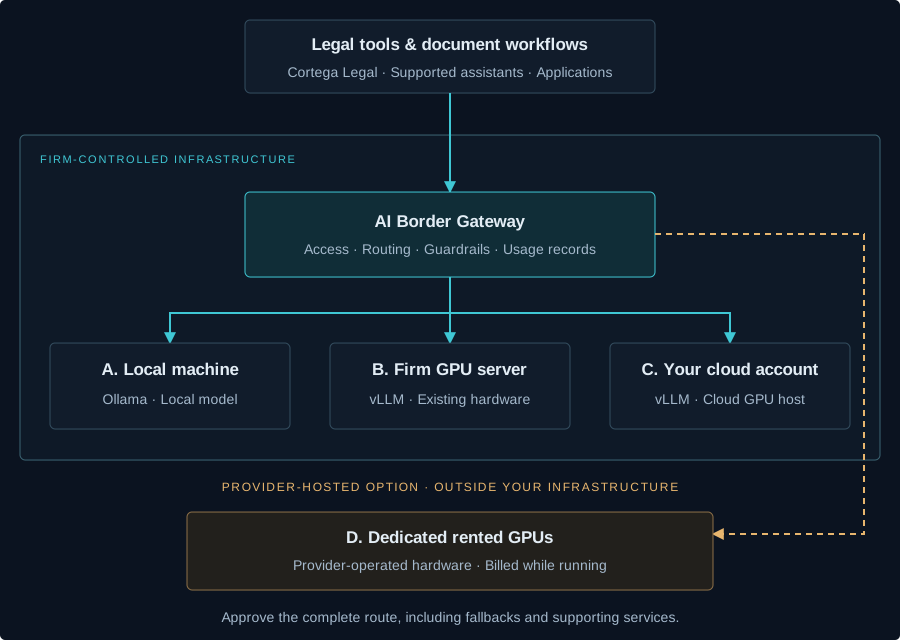
Keep inspection models, logs, backups, and verification services inside the intended boundary too. Web search, MCP tools, extensions, and external fallback models can send data elsewhere even when the main model is private.
Connect Claude Code or Codex through Cortega Legal. Mark sensitive work and configure its route to approved private endpoints. This gives the firm control over the inference destination and access policy.
Cortega Legal →Use shared GPU capacity for document analysis, summaries, and relevance review. For occasional large jobs, approved dedicated rental capacity can avoid a hardware purchase. Running hours, queueing, and startup time affect the cost and schedule.
Discovery workflow →Private hosting controls where inference runs; citation verification and document grounding check the answer. Add Cortega Legal checks and review the resulting evidence before using a draft or discovery finding.
Document verification →Use team model access, usage records, and configured spending limits to manage firm-wide demand. Cortega Legal’s matter selection adds matter context to request records; it does not create per-matter budgets.
Matter context →Match model quality, document length, memory, and concurrent users to the work. Start Ollama locally, deploy vLLM to an existing server or your AWS account, or create a dedicated deployment with a rental provider.
Add the provider and model, store its credentials in the gateway, and configure team access. Place AIBG and its data stores in the intended environment. Approve primary and fallback destinations explicitly.
Use Cortega Legal for the legal VS Code workspace, Endpoint Guard to configure supported assistants, or client-specific gateway settings. Endpoint Guard’s separate app-inspection path still sends traffic to its original destination; it does not replace a SaaS model with a private one.
Run representative documents, streaming requests, and tool calls. Check the selected model, failure routes, and captured data. Use Red Team to evaluate the chosen guardrails and model before rollout.
Red Team →Connect self-hosted models and registered rented GPU endpoints to AIBG. Model routing, guardrails, MCP governance, observability, and cost tracking are included. Hardware and provider charges are separate.
Add rented GPU lifecycle controls: attach an existing deployment, start or stop it, stop idle capacity, and track estimated spend and limits. Creating, sizing, and deleting the deployment remains with the provider. Enterprise also adds platform access and operational controls.
Cortega Hosted is a separate hosted service offering; it is not a model installation in your own cloud account. Air-gapped operation is a separate deployment choice that requires local runtime dependencies, models, and services.
Compare packages →Private AI Infrastructure
Start with the documents, users, data-location requirements, and expected workload.