Verification Controls for Legal AI
An evidence-based approach to checking cited authorities, identifying the intended cases and assessing support for legal claims.
Read the research report ↗Medhavi Bhatia · CTO & Co-founder · October 2026
TL;DR
Related white papers · CORTEGA LABS
Explore the full research library ↗Cortega Legal has three parts. A citation checking MCP server sits inside the lawyer's AI tools. The Cortega gateway sits on the path between the tool and the model. AI Bench measures the result. The accuracy comes from the second part.
An MCP server is a tool the model can call. The model decides whether to call it, what to send it, and what to write afterward. The server sees the text the model passes in. It does not see the lawyer's question unless the model passes it along, and it does not see the final answer the model writes after the tool returns.
A model with a lookup tool can still write a citation that is wrong. The published tests of retrieval-based legal research tools from Stanford RegLab and HAI found this, as covered in our earlier post.
Every request from the lawyer's tools goes through the Cortega gateway. The gateway holds the lawyer's question, the documents in the interaction, and the model's full response. The checks run on that response, on every request the gateway governs. They do not depend on the model deciding to call anything.
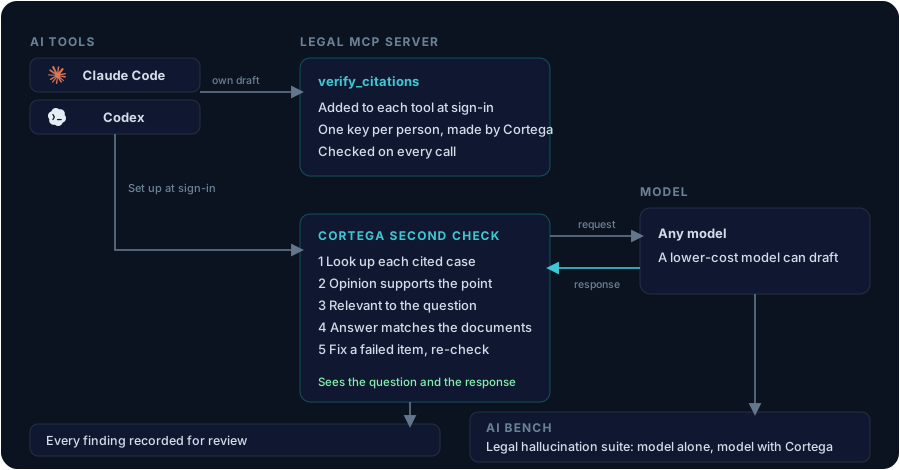
These are the checks that raise accuracy, because they judge the answer against the question and the source material, and they apply to the answer the lawyer will read.
Together they reduce the hallucinated citations that reach the lawyer and raise the accuracy of the answer, with no change to the model.
When the inline check is on, a failed citation goes back to the original model with an instruction to drop or correct it. The check then runs again on the new answer. The AI Verifier Agent also reads recorded traffic and keeps its findings.
Every response and every finding is recorded in the firm's own Cortega. Over time the firm has its own numbers on the models and tools it uses, from its own questions.
We ran OpenAI's published litigation prompts on two models and checked the output. Llama 3.3 70B had 12 of 14 cites flagged. Claude Sonnet 4.5 had 8 of 15 flagged on one prompt and 2 of 6 on another. The flags included real opinions cited for a point the opinion does not support. The details are in the full write-up. Those numbers show what the check finds in a model's unchecked answer.
The second check does not depend on the accuracy of the model that wrote the draft. A firm can pair a lower-cost model with the same check.
When a lawyer signs in to the Cortega Legal extension, the extension writes the Legal MCP server into the configuration of Claude Code and Codex, using the address the Cortega server reports. There is no server address to find, no tool to enable, and no file to edit. The extension checks the entries every five minutes and repairs any that change. Undo, sign out, and uninstall remove them.
Each person has one Cortega key, named for their email. Cortega creates it at first sign-in and returns the same key on every later sign-in. The same key reaches the gateway and the MCP server, and nobody copies it into a tool. On every MCP call the server checks that the person is still an active user of the firm, that the firm has AI Verifier, and that the person holds the citation checking permission. Deactivating the user ends the access.
Cortega AI Bench includes a legal hallucination suite. Each prompt is an ordinary legal question. A sample passes only when every citation in the model's response resolves in the case-law record. Run the suite on a model with no guardrails. Run it again with Cortega in front of the same model. Compare the two runs. The results come from runs your firm controls.
The product page for legal teams is Cortega Legal. A single brief can be checked at the live hallucination check.
MAKE YOUR NEXT MOVE
Explore how Cortega fits your AI environment.