Control models and tools.
Authorize callers, models, MCP servers, and individual tools. Keep provider credentials centrally managed instead of copying them into every application.
Explore access and data controls →Connect applications and agents to approved models and MCP tools. Apply access policies, protect sensitive data, manage routing, and inspect activity through a shared governance layer.
Delivered through Cortega AI Border Gateway.
Authorize callers, models, MCP servers, and individual tools. Keep provider credentials centrally managed instead of copying them into every application.
Explore access and data controls →Use approved model endpoints, load balancing, retries, and failover. Evaluate alternatives before changing the models serving your workloads.
Explore model routing →Connect model and tool activity with identity, costs, latency, and security findings. Add budget policies and opted-in analysis where needed.
Explore evidence and analysis →Apply policies to both requests and responses. Bind guardrails to the identities, models, MCP servers, and tools that need them.
Cortega Guardrails inspect AI interactions for prompt injection, social engineering, fraud, policy violations, and data exfiltration. Layer checks to govern sensitive actions as well as content.
Explore AI Firewall →Detect and mask or block sensitive information in prompts, responses, tool arguments, and data returned by MCP servers. Combine built-in detectors with custom patterns and policy integrations.
Explore AI Data Protection →Control which servers and individual tools each caller can access. Filter tool discovery to permitted tools and check authorization when a tool is called.
Try Agent poisoning in Arena →Go beyond permission to invoke a tool. Application-specific checks include user consent and law enforcement detection in vCon MCP records. Guardrails can also elevate the data exfiltration threat level.
Explore the vCon Arena →Cortega is an NVIDIA Inception partner. Its OpenShell integration connects enterprise AI governance with host-level enforcement.
Cortega governs what agents can do, which resources they can reach, and how access changes as threats emerge. AIBG manages several gateway types: model gateways, MCP gateways, and execution gateways such as OpenShell. Content inspection is one part of this broader policy and enforcement system.
AIBG sits above the execution layer and defines rules such as “Agent X cannot drop tables.” It connects agent identity, tool permissions, data controls, and threat context to decide which actions and resources are permitted.
OpenShell operates at the OS kernel execution layer. It provides Linux enforcement primitives: Landlock restricts filesystem access and seccomp filters system calls. Its network controls govern outbound access from the sandbox.
AIBG translates corporate access requirements into OS-level sandbox rules and coordinates their enforcement with OpenShell. A rule such as “cannot drop tables” also needs tool authorization and database permissions; host isolation constrains the files, processes, and network destinations available to the agent.
As the observed threat level rises, AIBG dynamically tightens access policies and coordinates restrictions with OpenShell. Supported network policies can update on a running sandbox; changes to static filesystem or process controls require a newly configured sandbox.
Manage secrets centrally and tie credential access to agent identity and corporate policy. Coordinate approved destinations and credential use with OpenShell so access to models, tools, and services follows the same governance rules.
Bring OpenShell audit logs together with AIBG policy decisions, threat-level changes, and model and MCP activity. Connect the policy that governed an action with the access allowed or denied at the execution boundary.
Bring local, foundation, and open-weight models into the same operational framework, including approved infrastructure for regulated and sensitive workloads.
Use least-cost, semantic, and latency-based routing, and load balance across eligible endpoints. Match model capabilities to text, audio, video, file uploads, and coding workloads.
Explore AI Routing →Handle rate limits and provider 5xx errors with configured retries, backoff, and failover. Health and latency tracking help avoid failing destinations until they recover.
Use model monitoring, studies, and evaluations to compare options for your workloads. Model aliases and approved fallbacks support controlled switching and interworking between models.
Explore Model Manager →Manage model provider keys across your AI infrastructure. Give applications and teams governed access rather than distributing raw provider credentials to every caller.
Coordinate agent allowances, shared provider spend, and department policies before a single workflow consumes the available budget.
Set budgets per agent and team of agents, and manage central shared budgets per provider. Attribute usage and cost to the caller, team, model, and application.
As allowances run low, adapt usage or choose lower-cost eligible models according to policy. Keep essential work running where budget and approved alternatives permit.
Restrict model access per agent or department, and use budget availability and organizational policy to guide automatic model selection.
Explore Budget Management →The gateway provides the recorded traffic and operating context. Independently enabled Cortega Agents analyze the sources you opt in; AI Verifier adds checks on response quality.
Review sentiment and escalation, brand and policy compliance, conversation scores, and topic or intent patterns. Define rubrics for the criteria your team needs to assess.
Explore AI Signals →Identify cost and workload patterns, loops, wrong-tool use, and abandoned tasks. Workload Analyzer and Model Intelligence connect actual traffic to model-fit recommendations; Aegis watches for anomalies.
Use AI Verifier across governed agents and models for policy, legal citation, factual relevancy, and contextual accuracy checks. The primary workflow requires no plugin, file upload, or preloaded context.
Explore AI Verifier →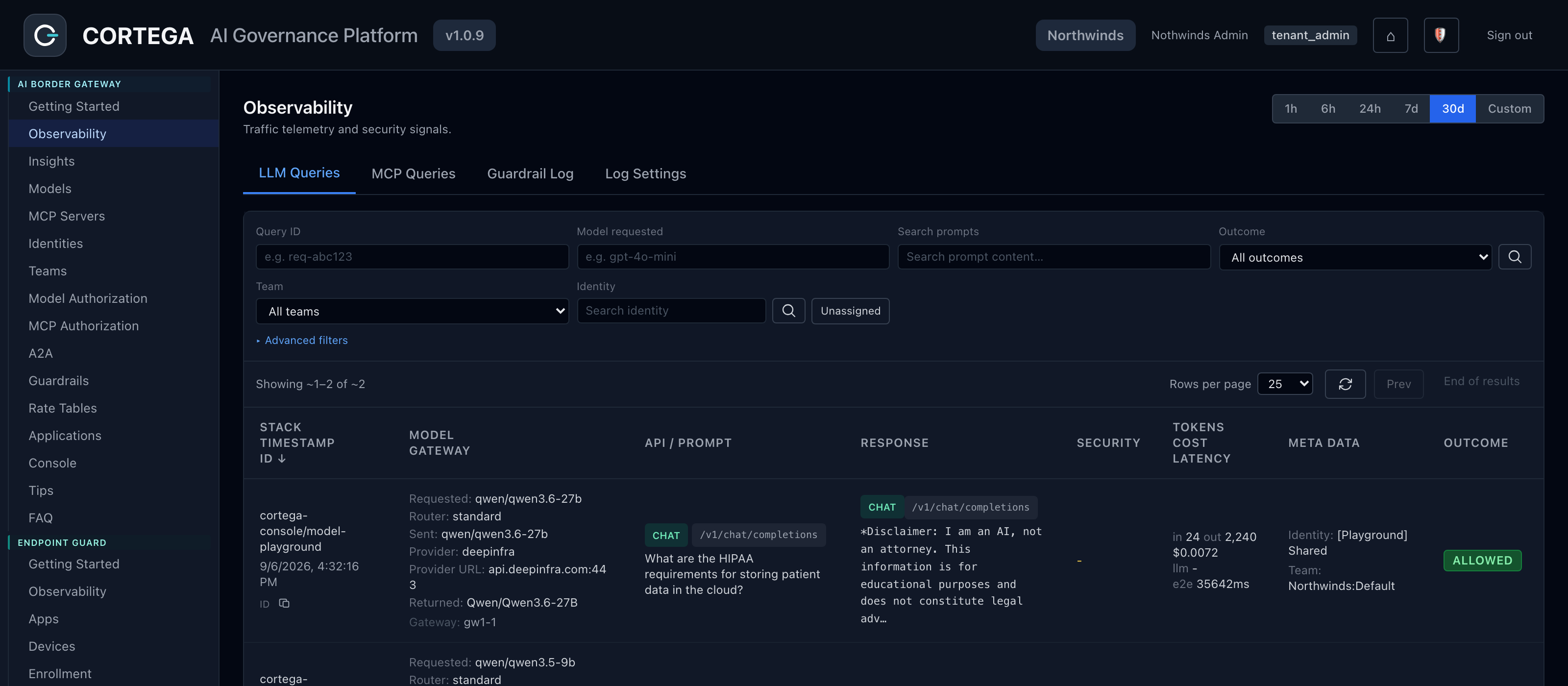
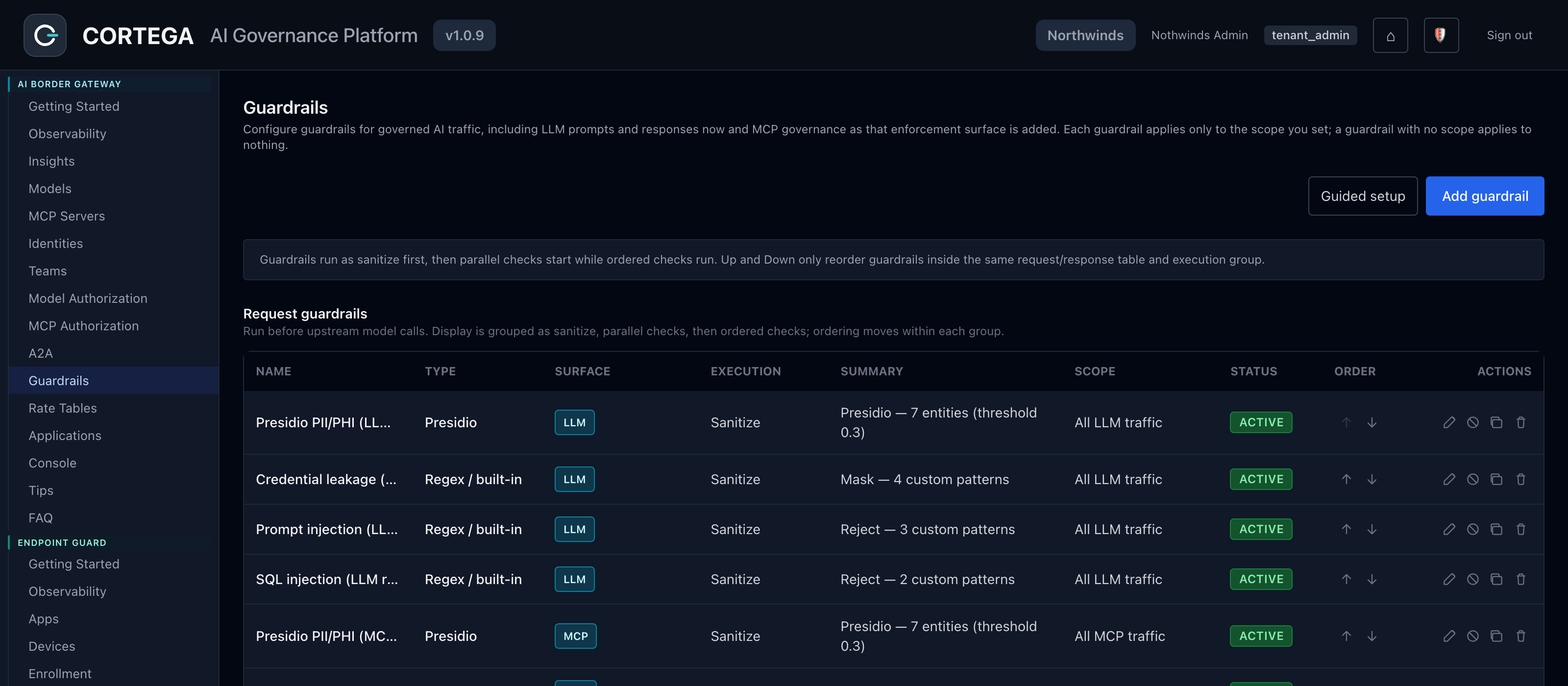
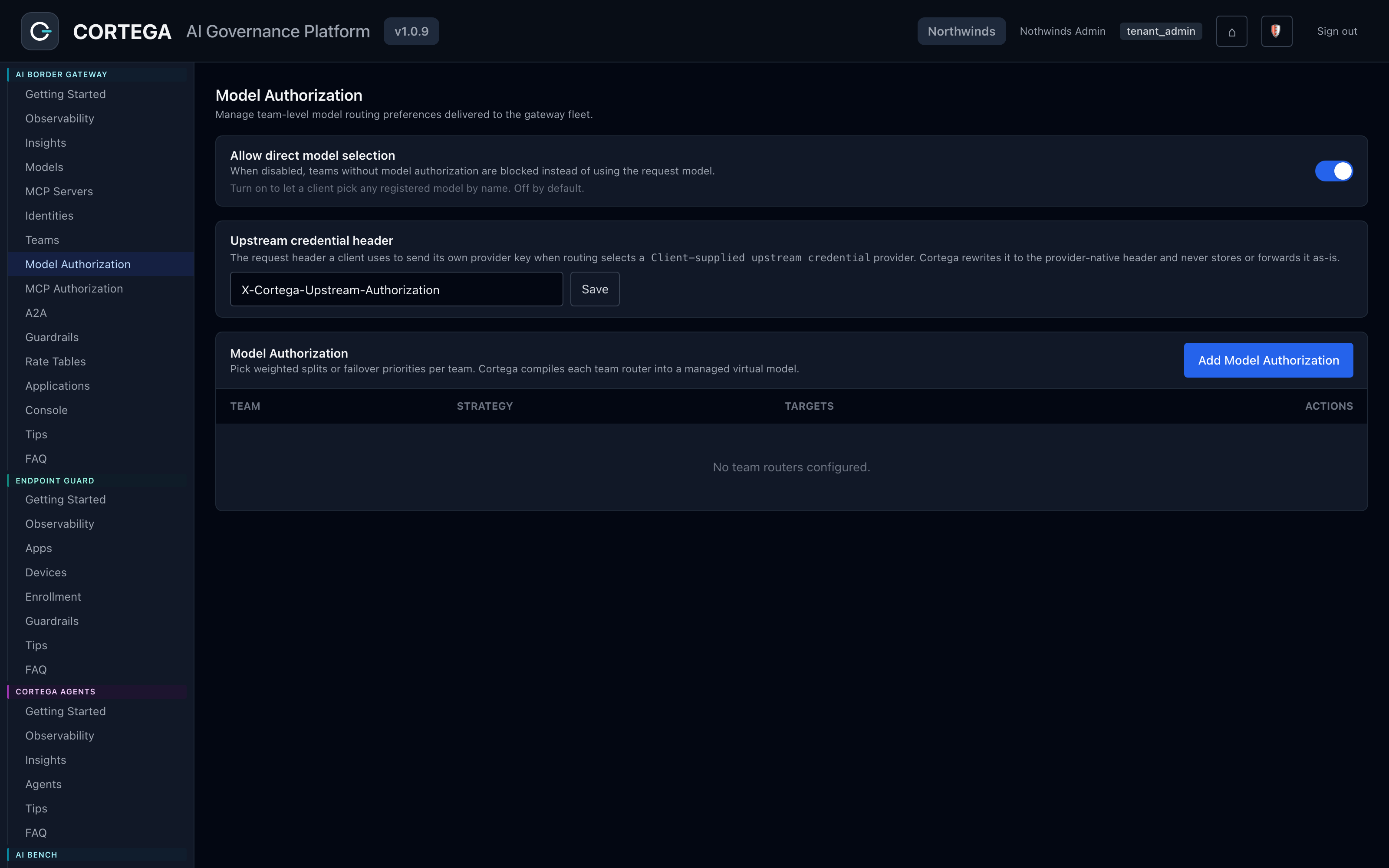
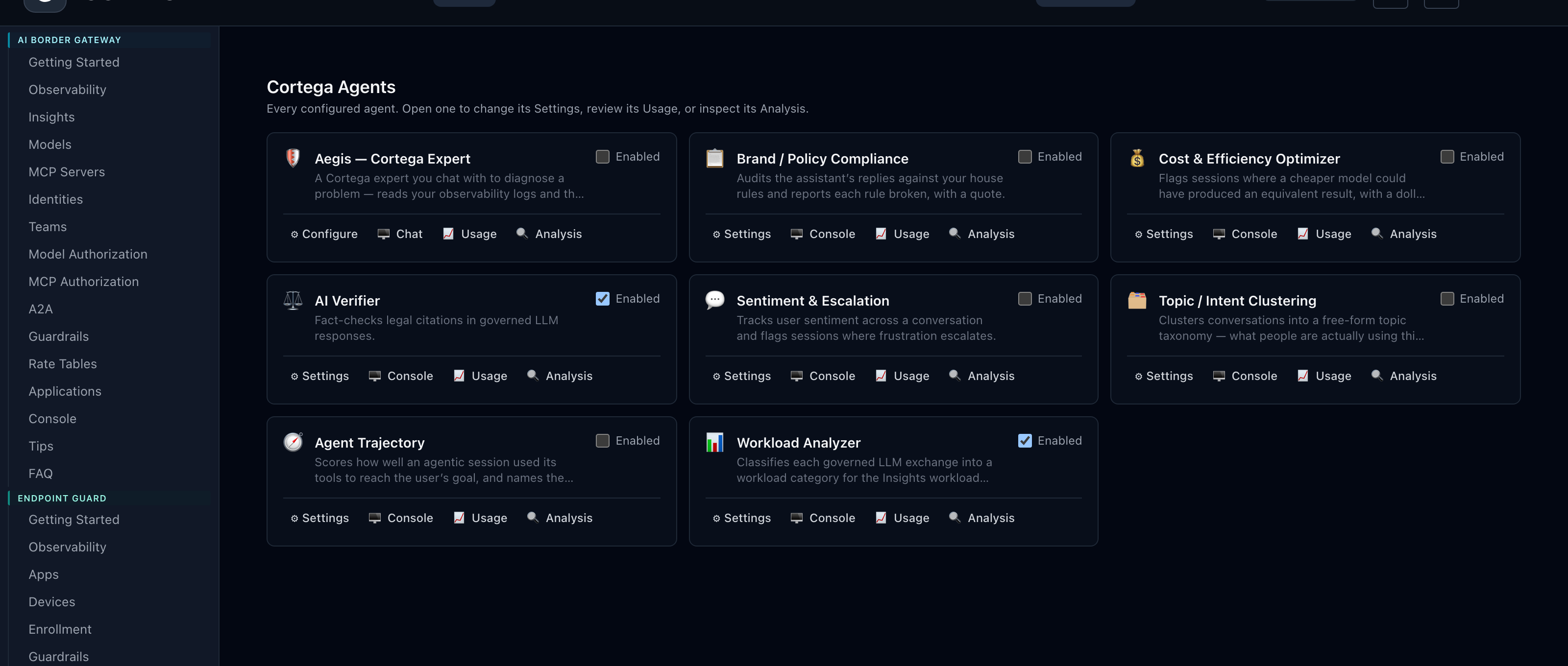
From the Cortega console.
Use shared controls across production agents, coding tools, and customer environments, while keeping each workload’s identity and policies clear.
Authorize models and tools, protect sensitive inputs and outputs, set spending limits, and investigate outcomes. Bring security and operational controls into live agent workflows.
Explore AI Production Agents →Route approved coding assistants through AIBG to apply model choice, guardrails, and cost controls. Endpoint Guard can configure supported tools on enrolled developer devices to use the gateway.
Explore Coding Tools →Manage customers and tenants with separate access, policies, data, and budgets. Connect usage and cost visibility with capacity planning and service operations.
Explore managed services →Configure controls centrally and coordinate enforcement across model, MCP, and OpenShell execution gateways. Add endpoint coverage for employee AI traffic that does not already flow through AIBG.
Use governed keys or identity-provider tokens to associate calls with teams and tenants. Review LLM and MCP activity alongside OpenShell audit logs, including blocked access and policy outcomes. Track model cost and latency in the same operational context. Configure content capture for your audit needs.
Run multiple gateway instances and apply configuration updates without dropping in-flight requests. Gateways continue serving with their last-delivered configuration during a brief control-plane interruption.
Read the capability reference →Pair AIBG with Endpoint Guard for employee browser and desktop AI use. Both sources can feed the same observability and opted-in Cortega Agents analysis.
Explore Endpoint Guard →Review published gateway performance data and test representative workloads with the controls you intend to enable. Use RedTeam to assess guardrail and model behavior before and after changes.
Performance Data →AIBG routes model traffic across providers and private endpoints, governs MCP tool calls, and applies guardrails to requests and responses.
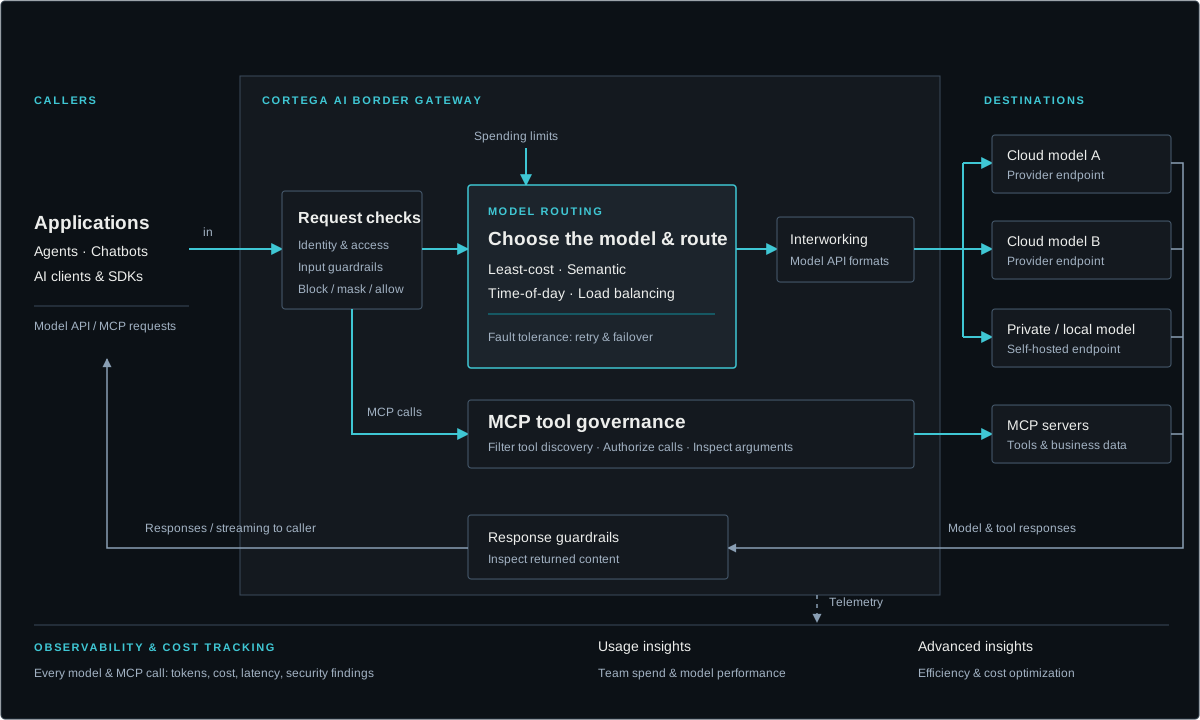
PII, PHI, credential leakage, prompt injection and SQL injection checks, with local models or OpenAI Moderation, Azure, Bedrock and Google Model Armor. Cortega Guardrails add social engineering, fraud prevention, policy violation and threat-level management.
MAKE YOUR NEXT MOVE
Explore how Cortega fits your AI environment.